Lesson 04
Functions and collections
Code organization and key-value data structures
Previously
Lesson 3 - loops and lists
- while and for + range()
- break and continue
- Lists and indexing
- Slicing and steps
- List methods
- Iterating collections
Lesson 2 recap
Variables and types
Every value has a type. Python infers it automatically.
Lesson 2 recap
Input and conversion
input() always returns a string. For numbers you need int() or float().
Lesson 2 recap
Conditions if / elif / else
Different branches for different cases. An f-string embeds values into text.
Lesson 3 recap
The for loop and range
Repeat a known number of times. range(1, 6) yields 1..5 (no 6).
Real world
The for loop in practice
Not a toy example: a loop polls a health endpoint until the service comes back up after deploy.
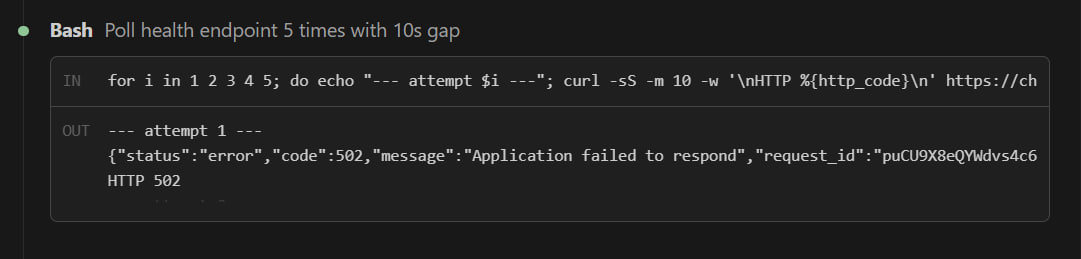
for i in 1 2 3 4 5; do ... done - this is what monitoring, retry logic, migration tests and hundreds of other things are built on.
Lesson 3 recap
Lists and slicing
Ordered collection. Zero-based indexing. Slicing with a colon.
Lesson 3 recap
break and continue
continue: skip this iteration. break: exit the loop.
Today
Functions and collections
What is it?
Tuples
An ordered collection that cannot change after creation. Used for fixed groups: coordinates (x, y), RGB color, dates (year, month, day). Python returns a tuple when a function returns multiple values at once.
Why?
Tuple vs list
If lists exist, why use tuples? Immutability isn't a weakness - it's protection.
Mutable
- • can add / remove items
- • fits growing data
- • slightly slower
Immutable
- • safe from accidental edits
- • can be a dict key, set item
- • faster, lighter
Fixed groups (coordinates, RGB, dates) → tuple. Growing collections → list.
Example 1
Access by index
Predict the result. Press → to reveal.
Indexing starts from zero, like a list. capitals[-1] is the last element.
Example 2
Tuple length
Predict the result. Press → to reveal.
len() works on any collection: tuple, list, set, dict, str.
Example 3
Trying to mutate
What happens if we try to reassign an element? Press → to reveal.
This is a feature, not a bug: tuples can't be accidentally broken. Need a different value? Build a new tuple.
What is it?
Sets
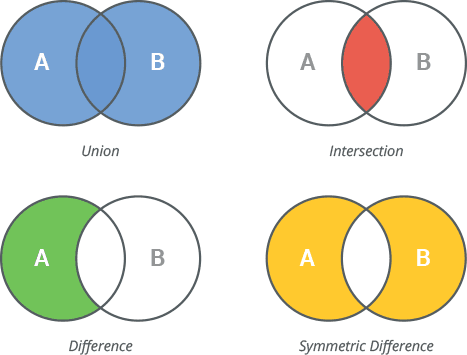
A structure from math: a collection of unique elements with no defined order. Python silently drops duplicates. The superpower is x in set - O(1) membership, instant even across millions of items.
Motivation
Why we need sets
Fast lookup · dedup · set algebra
Deduplication
Strip duplicates in one line: list(set(items)).
Fast lookup
x in set - O(1), not O(n) like a list.
Set algebra
Intersection, union, difference - one line instead of nested loops.
Example 1
Automatic deduplication
What does Python do with the duplicate "python"? Press → to reveal.
The second "python" is gone - the set silently dropped the duplicate. Order isn't guaranteed.
Example 2
Length after dedup
We wrote 4 elements - how many end up in the set? Press → to reveal.
Not 4 but 3 - sets count uniques only. A clean way to answer "how many distinct values are in this list?"
Example 3
Membership test
What does x in set return? Press → to reveal.
Lookup in a set is O(1). The same in on a list would be O(n) - huge difference on a million items.
Operations
Set algebra
| Op | Meaning | Example |
|---|---|---|
| a | b | Union | {1,2,3} | {3,4} → {1,2,3,4} |
| a & b | Intersection | {1,2,3} & {2,3,4} → {2,3} |
| a - b | Difference | {1,2,3} - {2,3} → {1} |
| a ^ b | Symmetric diff. | {1,2,3} ^ {2,3,4} → {1,4} |
De-duplicate a list with list(set(items)) - but order is lost.
What is it?
Dictionaries
A mapping from a key (name, ID, date) to a value (any object). Lookup by key runs in O(1). It's Python's workhorse collection: JSON responses, configs, caches, function parameters - all dicts under the hood.
Motivation
Why we need dicts
Dict is Python's workhorse collection. JSON, configs, APIs, caches - all dicts under the hood.
Lookup by name
Phone book: name → number. O(1) instead of scanning a list.
JSON ↔ dict
API responses, configs, save files - all dicts in JSON wrappers.
Replace if-elif
10 if-elif branches → one d[key].
Example 1
Lookup by key
Predict the result. Press → to reveal.
Square brackets with a key, like a list - but a name instead of a number: d["name"].
Example 2
How many pairs in a dict
Predict the result. Press → to reveal.
len(d) is the number of pairs (key, value). Not "number of keys" or "number of values" - they're the same number.
Example 3
Key membership test
Does in check keys or values? Press → to reveal.
Keys only! "Alice" is a value - search for it with in user.values().
Access
Read by key
Click an expression - see the result:
d[k] on a missing key raises KeyError. .get() returns None or your default.
Iteration
Looping over a dict
Question
Which collection fits best?
Store «city → population» pairs with fast lookup by city
list - ordered sequencetuple - immutableset - unique itemsdict - key-value pairsThink for a minute →
Answer
D - dict
"City → population" is exactly the scenario dict was built for.
list would search in O(n). set only holds values, with no association. tuple is immutable. dict is the only type actually built for key → value.
Cheat sheet
Collections - when to use which
| Type | Mutable | Ordered | Duplicates | Main use case |
|---|---|---|---|---|
| list [] | yes | yes | yes | growing sequence |
| tuple () | no | yes | yes | fixed group |
| set {} | yes | no | no | unique + fast lookup |
| dict {k:v} | yes | yes (3.7+) | keys unique | lookup by name/key |
"Lookup by name?" → dict. "Unique values, fast in?" → set. "Changes?" → list. "Doesn't change?" → tuple.
Halfway through
Break
5–10 minutes
☕ Coffee, stretch, questions - see you in the second half for functions
Motivation
Why we need functions
Without functions a 10,000-line program becomes hell. A function is a named block of code with its own world.
Reuse (DRY)
Describe logic once - call it a thousand times. Fix in one place - fixed everywhere.
Naming
Self-documenting code: calc_tax(...) beats 5 lines of formula.
Isolation
Own scope inside. Locals don't leak out. Outsiders can't break the internals.
Without vs with a function
One rule instead of 50 copies
Left: duplication hell. Right: reusable code.
Each order is a copy-paste
Write once, call 50 times
Tax rate changed? Left side: 50 edits, easy to miss one. Right side: one line.
Syntax
Syntax: def
Defining a function - describing how to call it
Step by step
How a call works
Click "Run" - each step appears in turn
| Step | Action | Value |
|---|---|---|
| 1 | call square(4) | n = 4 |
| 2 | n * n | 16 |
| 3 | result = 16 | result = 16 |
| 4 | return result | → 16 |
| 5 | x = 16 | x = 16 |
return
Returning a value
return ends the function. Multiple values come back as a tuple - you can unpack them into separate names.
Optional
Default parameters
Type a name and greeting - leave a field blank to use the default
Defaulted parameters come after required ones in the signature.
Trap #1
Mutable default arguments
Default is evaluated once - at function definition, not on every call
One list shared across calls
New list every call
"One shared notebook on the teacher's desk" vs "a fresh sheet for each student". Never use [], {}, set() as default values.
Positional
*args - variable positional
Drag the slider - watch arguments pack into a tuple
Keyword
**kwargs - variable keyword
Add or remove fields - kwargs packs them into a dict
Parameter order
Where does each value land?
Strict order: required → defaults → *args → keyword-only → **kwargs
Everything after *args is keyword-only. status can only be passed by name - otherwise the value would end up in args.
f(*lst, **dct) - the same * and ** work in reverse: spread a list/dict into arguments.
Before diving in
Why do we need scope at all?
Imagine a 10,000-line project. If every variable were global, hell would start at line 10.
Name chaos
- • Every function knows everything
- • Can't reuse
i,temp,resulttwice - • Change one - break another
- • Nobody knows who mutates what
Isolated worlds
- • Each function has its own namespace
- •
iinf()≠iing() - • Local changes stay local
- • Easy to reuse and test
Scope is a one-way mirror window. From inside a function you see the outer world (globals). From outside you have no access to local names.
Visibility
Scope
Click a name - Python looks it up via the LEGB rule
Rules
LEGB - name lookup order
Python searches names in this order
| Level | Where |
|---|---|
| L · Local | Inside the current function |
| E · Enclosing | In the outer function (if nested) |
| G · Global | Module level |
| B · Built-in | Built-in names: print, len, range... |
Assigning x = 5 inside a function creates a local variable, even if a global with the same name exists.
Writing to outer scope
global and nonlocal
Reading sees outer scope. Writing creates a local. To rebind an outer name you need the keyword.
write to module-level
write to enclosing function
You get UnboundLocalError - Python treats the name as local the moment it sees an assignment. global explicitly says "don't create a local - write to module scope".
Concise
Lambda functions
A short, anonymous, single-expression function
Multi-line
One line
Syntax: lambda args: expression. One expression only - no return keyword.
Line of good taste
When lambda becomes bad
Lambda is great for short expressions. If logic branches - write def. Code is written for humans.
Triple-nested ternaries
Plain function
Lambda over ~50–60 chars or with conditionals - rewrite as def. A function name is free documentation.
Usage
lambda + sorted
Click a button - the cards physically rearrange
Trap #2
Late binding in lambda
A lambda captures the variable name, not its value at creation time
By the time we call the three lambdas the loop is done and i = 2. All three look at the same name.
Question
What does this code print?
15 / 25 / 1015 / 25 / 215 / 25 / Error15 / 20 / 10Think for a minute →
Practice 1
Stats calculator
- 1 Write a function stats(*nums)
- 2 Return a dict: min, max, avg, count
- 3 If no args - return None
- 4 Test: stats(1, 2, 3, 4, 5)
Solution
Solution 1 walkthrough
Practice 2
Top-3 students
- 1 Write top_n(scores, n=3)
- 2 Use sorted + lambda by value
- 3 Return n best (name, score) pairs
Hint: scores.items() gives pairs; reverse=True for descending.
Solution
Solution 2 walkthrough
Try it yourself
Live Python in the browser
Edit the code and click "Run" - it's real Python via Pyodide
Practice tasks
Jupyter Notebook
10 tasks covering today's topics. Open in Jupyter or VS Code and work through them.
Wrap-up
Lesson summary
- Tuples, sets, dicts
- def, return, parameters
- Mutable defaults trap
- *args and **kwargs
- LEGB · global · nonlocal
- lambda + sorted/map/filter
- Late binding in lambda
- Unpacking f(*lst, **dct)
Modules, files and error handling - reading/writing data and try/except
Questions?
Telegram: @gokalqurt